

Shopify and ChatGPT: fix your product data first

In this guide
- How does Shopify’s ChatGPT integration work?
- Is your Shopify store eligible for ChatGPT?
- What product data does ChatGPT read?
- Where do eBay listings fall short?
- How do you clean up your product data in an evening?
- What should you leave alone?
- Why does stock matter for one-of-a-kind items?
- Can KickSync do the store side for you?
- Common questions
TL;DR: If your Shopify store sells to US customers, ChatGPT can probably show your products already, with nothing to install. Whether it picks yours comes down to your product data: a title that says what the item is, a description that starts with the facts, the condition in plain words, and stock that’s right. If your store was built from eBay listings, rewrite the titles for people instead of eBay search, put the condition up front, and make sure an item that sells on eBay comes out of the store’s stock too.
Shopify stores sell on ChatGPT through Shopify’s agentic storefronts. Shopify sends your products to ChatGPT through Shopify Catalog, on by default for eligible stores. When a shopper picks one, they buy it on your store, not inside ChatGPT, and the sale carries no fee beyond your usual payment processing. Whether ChatGPT shows an item, and how it describes it, comes down to the product data you give it.
Below: how it works, who’s eligible, what ChatGPT reads, the gaps eBay-style listings bring into a store, and a checklist to close them. Rules and settings are as of November 2026.
How does Shopify’s ChatGPT integration work?
Shopify calls it agentic storefronts: one place in your admin, Sales channels > Agentic, that sends your products to AI assistants. On March 24, 2026, Shopify announced that products “become discoverable in ChatGPT by default via Agentic Storefronts, with no separate integrations, no apps, and no transaction fees beyond standard processing rates” (Shopify’s announcement). Its help pages say agentic storefronts are active by default for eligible stores, so there’s nothing to turn on (Shopify’s help).
A sale runs like this (Shopify’s ChatGPT help):
- Shopify Catalog sends ChatGPT your eligible products, with their titles, descriptions, options, images, prices, and availability, and keeps prices and stock current.
- A shopper asks ChatGPT for something, and ChatGPT shows the products it judges a fit.
- The shopper picks yours, and your store’s checkout opens: in ChatGPT’s in-app browser on a phone, or in a new tab on the web. Your branding and payment methods apply, and the order is yours.
So ChatGPT is where shoppers find you, not where they pay. OpenAI tried checkout inside the chat, called Instant Checkout, and has moved away from it: purchases happen on the merchant’s own site (OpenAI’s page for merchants).
Is your Shopify store eligible for ChatGPT?
It is if it meets Shopify’s requirements, from its ChatGPT help and its Shopify Catalog requirements:
- The store: on the Starter plan or higher, without a password, and selling to customers in the United States (the store itself can be based anywhere). Its terms of service, privacy policy, and return and refund policy are filled in under Settings > Policies.
- Each product: a title, at least one image, a price above $0, available on your online store, and not set to Unlisted.
- The category: not one Shopify Catalog leaves out.
That excluded list includes some resale stock: collectible coins and banknotes, toy weapons and airsoft, hunting and archery gear, fireworks, and warranties and other add-ons. It also leaves out anything Shopify classifies as Uncategorized. Shopify classifies from your product information, which can differ from the category you picked, so a vague title can keep an item out.
Shopify also weighs the account: a verified email, two-step authentication, real orders fulfilled promptly, and a low chargeback rate. A new store with few orders may show as ineligible until it builds a history.
To check yours, go to Sales channels > Agentic, then Shopify Catalog under Sources. An eligible store shows its product count. An ineligible one shows an Ineligible warning; click it for the reason.
What product data does ChatGPT read?
From a Shopify store, ChatGPT gets what Shopify Catalog sends: the title, description, options such as size and color, images, price, availability, and “other key attributes” (Shopify’s help on products). ChatGPT can also read your public product pages, and reviews elsewhere on the web.
When several sellers have the same item, ChatGPT ranks them on availability, price, quality, and whether the seller is the maker or main seller (OpenAI’s help). With a one-of-a-kind used item, you’re often the only seller, so the question is simpler: does ChatGPT understand the item well enough to show it?
OpenAI’s product feed spec, for merchants who send their products to ChatGPT directly, is the clearest list of what it wants. You don’t fill it in as a Shopify store, since Shopify Catalog builds your data from your products, but each field has a home in Shopify:
| Field | OpenAI’s guidance | Where it lives in Shopify |
|---|---|---|
| Title | Required; up to 150 characters | Title |
| Description | Required; plain text, up to 5,000 characters | Description |
| Brand | Required, as it appears on the product page | Vendor |
| Condition | New, refurbished, or used; always state used or refurbished | The Google & YouTube channel’s Condition field, if you use it; say it in the title and description too |
| GTIN | Optional; a real barcode, never an invented one | Barcode, on the variant |
| Color, size, material | Optional | Variant options and category metafields |
| Images | A main image required, more views optional | Media |
| Price and availability | Required, and kept current | Price and inventory |
Shopify doesn’t say which fields beyond the title, description, options, images, price, and availability it passes on, so don’t rely on a field nobody sees. Anything that matters to a buyer, condition above all, belongs in the title or the description as well.
Where do eBay listings fall short?
A store built from eBay listings carries eBay habits into the data ChatGPT reads. Four come up most.
- Titles written for eBay search. eBay allows 80 characters, and sellers fill them with keywords and shorthand (“NWT”, “EUC”, “Sz”). That’s right for eBay (how eBay search reads titles). But shoppers ask ChatGPT in sentences, and it reads for meaning, not keyword matches (Shopify’s guide to ChatGPT shopping).
- Condition left behind. On eBay, condition is its own field. Shopify’s guide to moving from eBay carries it into the Google Shopping condition column, if you map it, not into the title or description. Unless one of those says “used”, a shopper may never see it.
- Item specifics left behind. Brand, size, color, and material live in eBay’s item specifics. Shopify’s guide imports from eBay’s active listings report, which, it notes, has no item specifics, descriptions, or photos.
- Descriptions that are mostly policy. Many eBay descriptions are a template of shipping, returns, and payment terms with a line about the item. Shopify recommends full sentences about the product and its key details, not lists of keywords. Your store’s policies already cover the terms, and agentic storefronts let you add shipping times and return steps to a knowledge base that AI assistants can answer from.
How do you clean up your product data in an evening?
Start with the items that matter most, your best sellers and highest prices, not the whole catalog.
-
Check what’s going out. In Sales channels > Agentic, under Sources, compare Shopify Catalog’s product count with the number of products in your store. Shopify groups variants together, so the numbers won’t match exactly, but a big gap means products are failing the requirements.
-
Fix the products that can’t go. Find the ones with no image, a $0 price, or Unlisted status, and give each product a category.
-
Rewrite the titles for people. Brand first when there is one, then what it is, the model, size, color, and condition, in words. Drop the shorthand:
Written for eBay search Written for a shopper Mens Wool Peacoat Jacket Sz 40 Charcoal Gray Double Breasted Winter Coat EUC Men’s double-breasted wool peacoat, size 40, charcoal gray, used in excellent condition -
Start each description with the facts. One or two sentences on what the item is and its condition, flaws included, then measurements and details, all in full sentences. Move shipping and return boilerplate to your store’s policy pages.
-
Fill in the structured fields. The brand in Vendor, size and color as variant options, and a barcode only when the item has one. If you use the Google & YouTube channel, set Condition there too.
-
Check the photos. The first image should show the whole item on its own. More views help.
-
Ask ChatGPT. Ask the way a buyer would (“a men’s wool peacoat in size 40 under $80”) and see whether your item shows and how it’s described. Answers don’t change the moment you save, so check again after a few days.
What should you leave alone?
Some changes cost more than they bring, especially just before your busiest weeks.
- Your product URLs. OpenAI asks for product links that stay stable, and a changed address breaks the links already out there. Rewrite the title, but leave the URL handle in the product’s search engine listing as it is.
- The default setting. Allow Shopify to manage for me is on unless you change it, and lets Shopify run your AI channels. Turn it off only to opt out of one, and know that sharing can take up to 7 days to stop.
- OpenAI’s crawler. Blocking OAI-SearchBot in your robots.txt doesn’t stop Shopify Catalog, but it keeps your pages out of ChatGPT’s search answers (OpenAI’s help).
- Made-up barcodes. OpenAI’s spec says not to make up an identifier for an item that has none. An item without a barcode goes without one.
- Keyword lists. Pasting search terms into a description doesn’t help; Shopify recommends sentences.
Why does stock matter for one-of-a-kind items?
Shopify Catalog sends ChatGPT your current stock, and OpenAI asks merchants to keep availability in sync, and ranks on it. If the same item is listed on eBay and in your store, an eBay sale has to come off the store’s stock right away. Otherwise ChatGPT can send a buyer to an item you no longer have, and you’re left cancelling an order.
Can KickSync do the store side for you?
Yes, if you’re an eBay seller building a Shopify store from your eBay listings. KickSync builds the store and keeps it in step, and Shopify Catalog carries it to ChatGPT from there. The steps:
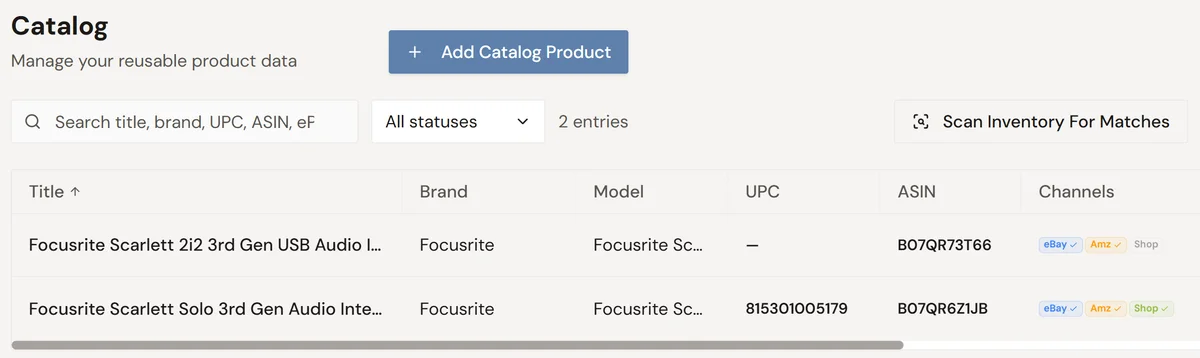
- Connect eBay, and your listings come in automatically, with their photos, price, and details.
- KickSync fills in the category and product data. Each item gets the structured fields Google Shopping reads (brand, GTIN, Google category, color, material, and more), so you’re not filling them in product by product.
- Turn on Auto-Publish for Shopify, and KickSync lists your items in your Shopify store with that data. List something new on eBay and Auto-Publish lists it in your store too.
- A sale anywhere updates the quantity everywhere, in minutes. When an item sells on eBay, its quantity in your store updates too, so the stock ChatGPT sees stays right.
What stays yours is the writing. After an item is first listed, only its quantity is kept in sync, so you can rewrite your store’s titles and descriptions for people who ask in sentences, while your eBay titles stay written for eBay search.
That’s the case for it: in a store built from eBay listings, the slow part is the product data, item by item, and the risky part is stock on one-of-a-kind items. KickSync does both and leaves the words to you (how it works for eBay sellers). Starting from your store instead? List an item once in KickSync and it goes to your Shopify store, eBay, and Amazon in one action (for Shopify sellers).
Common questions
Does selling on ChatGPT through Shopify cost anything?
Shopify’s help says there are no fees for selling in ChatGPT: you pay only your standard payment processing fees. Your Shopify plan still applies, and it must be Starter or higher.
Can customers buy inside ChatGPT?
Not from a Shopify store. ChatGPT sends the shopper to your store’s checkout, in its in-app browser on a phone or a new tab on the web. Shopify’s direct checkout inside the chat works in Microsoft Copilot, Google’s AI Mode and Gemini, and Meta, but not in ChatGPT.
Why aren’t my products showing in ChatGPT?
Check eligibility first, under Sales channels > Agentic: the store’s plan, password, and policies, and each product’s image, price, and category. Then the data: a product ChatGPT can’t make sense of rarely gets picked. Even an eligible product isn’t shown for every question; Shopify says eligibility doesn’t guarantee a place in any particular AI answer.
How do you stop your products showing in ChatGPT?
In Sales channels > Agentic, turn off Allow Shopify to manage for me, click ChatGPT, turn off Shopify Catalog access, and click Save. Sharing can take up to 7 days to stop, and products can still turn up through ChatGPT’s web search. To hide a product completely, set its status to Unlisted, which also takes it out of Google and your store’s own search.
Do you need the ChatGPT Business app?
No, it’s optional. It lets you claim your business profile in ChatGPT and see how often ChatGPT mentions your business and how many visits it sends. US stores can also set up a business agent that answers shoppers’ questions in ChatGPT; it doesn’t complete purchases.