KickSync takes what you sell on eBay and lists it in your Shopify store and on the other marketplaces. When something sells, the quantity updates everywhere. You keep listing the way you do now.
KickSync takes what you sell on Amazon and lists it on eBay and in your Shopify store, automatically. When something sells, the quantity updates everywhere. You keep running your Amazon shop.
Keep selling on eBay, but build something that’s yours.Keep running your Amazon shop, but build something that’s yours.
01Connect
Connect eBay.Amazon. Your listings come in.
One sign-in brings in your listings with their photos, prices, and quantities. Then keep listing on eBay the way you do now, or list in KickSync. Up to you.
One sign-in brings in your listings with their photos, prices, and quantities. Then keep listing on Amazon the way you do now, or list in KickSync. Up to you.
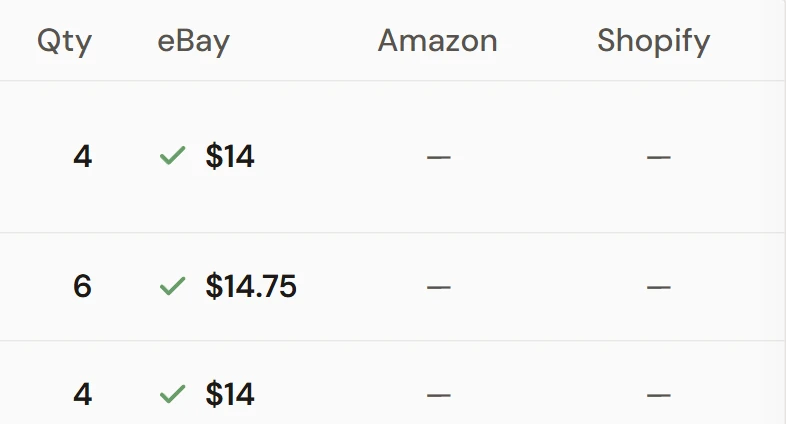
Your inventory in KickSynceBay ✓
The real app (demo account). Amazon and Shopify fill in next.
Your listings, in KickSyncAmazon ✓
Your listingsPhotosPriceQuantity
0203Auto-Publish
A store with your name on it.
Turn on Auto-Publish for Shopify, and your eBay items list in your Shopify store on their own, with their photos, price, and details. That’s one switch.
Turn on Auto-Publish for Shopify, and your Amazon items list in your Shopify store automatically, while you keep running everything from Amazon.
Listed with photosListed with priceQuantity in sync
0304Found on Google
Found on Google, not just one marketplace.
Your Shopify listings carry the product data Google Shopping needs. Link your store to Google once, and buyers searching there can find every item.
Sent with every itemfor Google Shopping
brand✓
gtin / upc✓
google category✓
color, material✓
# and more
0402AmazoneBay
Meet buyers on Amazon, too.
Turn on Auto-Publish for Amazon, and KickSync finds each item’s match in Amazon’s catalog. You confirm it, and it lists.
iAmazon sells from its own catalog, so each item needs your OK once.
Used items list with your own photos
Your items on eBay. Hands off.
Set your eBay shipping, return, and payment policies once, then turn on Auto-Publish for eBay. Your Amazon items list there automatically, with their photos, price, and details.
Fully automaticRun it all from Amazon
05Sold
Sell it anywhere. Updated everywhere.
When something sells, every other channel updates in minutes, not hours. Down to your last one? It comes down everywhere, so you don’t sell it twice.
One sale, every placein minutes
eBay, Shopify, Amazon: the quantity goes from 2 to 1 in every place after one sale.
eBayQty 21
ShopifyQty 21
AmazonQty 21
Amazon, Shopify, eBay: the quantity goes from 2 to 1 in every place after one sale.
AmazonQty 21
ShopifyQty 21
eBayQty 21
Sell everywhere you’ve been meaning to.
KickSync takes what you sell on eBay or Amazon and lists it in your Shopify store and on the other marketplaces. When something sells, the quantity updates everywhere. You keep listing the way you do now.
Your eBay items, listed in your Shopify store and found on Google.Your Amazon items, on eBay and in your Shopify store, automatically.
You keep listing here
eBayAmazon
Leather brogue boots
Used · $165 · Qty 2
Where you want to sell
Your Shopify storeFound on GoogleNot listed yet
AmazonItems in Amazon’s catalogNot listed yet
eBayAutomaticNot listed yet
From eBayFrom where you sellNot listed yet
The real KickSync inventory (demo account).
Keep selling on eBay, but build something that’s yours.Keep running your Amazon shop, but build something that’s yours.
Step 1 of 3
Connect eBay. Your listings come in on their own.
Connect Amazon. Your listings come in on their own.
One sign-in brings in your listings with their photos, prices, and quantities. Nothing to retype.
Step 2 of 3
Turn on Auto‑Publish for your Shopify store.
Turn on Auto‑Publish for eBay and Shopify.
That’s one switch. From then on, your eBay items list in your store on their own, with their photos, price, and details.
Set your eBay shipping, return, and payment policies once, then flip both switches. From then on, your Amazon items list on eBay and in your Shopify store automatically.
iSelling on Amazon too? Turn it on there, and KickSync finds each item’s match in Amazon’s catalog. You confirm it, and it lists.
Auto‑Publish to Shopify
Auto‑Publish to eBay
Auto-Publish, set channel by channel, in the real app (demo account).
Step 3 of 3
Then keep listing on eBay. We’ll take care of the rest.
Then keep running your Amazon shop. We’ll take care of the rest.
Every new listing you add on eBay goes to your Shopify store on its own.
Every new item you add on Amazon goes to eBay and your Shopify store on its own.
On eBayOn AmazonKeep listing the way you do now.
or
In KickSyncList there instead, if you’d rather.
Up to you. Either way, KickSync picks it up.
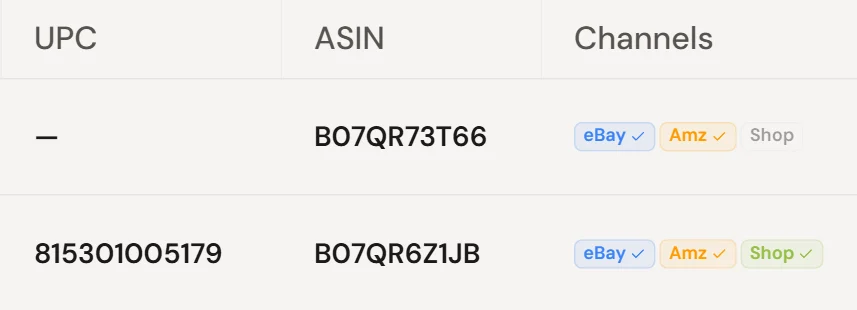
UPCListed on each channel
Two items in the real KickSync catalog (demo account).
What you get
Found on Google, not just inside one marketplace.
Your Shopify listings carry the product data Google Shopping needs, like brand, UPC, and category. Link your store to Google once, and buyers searching there can find every item.
What you get
Sell it anywhere. The quantity updates everywhere.
When something sells, every other channel updates in minutes, not hours. Down to your last one? It comes down everywhere, so you don’t sell it twice.
eBayAmazon21
Shopify21
AmazoneBay21Sold
Orders from each channel in one list (demo account).
Keep what works. Add what’s yours.
Your eBay shop runs the way it always has. Now every item is also listed in a Shopify store with your name on it.Your Amazon shop runs the way it always has. Now every item is also listed on eBay and in a Shopify store with your name on it.
Real screens from KickSync, with a demo account’s items. Connect your store and yours come in the same way.
Auto-Publish, channel by channel.
One switch for each place you want to sell: turn on Auto-Publish for your Shopify store, or for eBay if you sell from Amazon, and KickSync lists your items there.
Every item, and where it’s listed.
Connect eBay or Amazon and your listings come in automatically, with their prices and quantities.
Orders from every channel, together.
When something sells, your other channels update in minutes, not hours.
Keep listing where you list. Or in KickSync.
On eBayOn AmazonKeep listing the way you do now.
or
In KickSyncList there instead, if you’d rather.
Up to you.Either way, new listings go to your Shopify store on their own.Either way, new items go to eBay and your Shopify store on their own.
Start where you already are.
Connect eBay or Amazon, turn on Auto-Publish, and KickSync does the listing from there.
No Shopify store yet, or want a hand? Book a setup call and go through it with the team.
Since 2016. KickSync has kept sellers’ inventory in sync for ten years.
Pricing
$40a month to start
You only pay for items you sell on more than one channel, and there are no per-order fees. Plans run from $40 to $100 a month, by how many items you sync.
What is cross listing, and how does KickSync do it?
Cross listing is selling the same item in more than one place. With KickSync, you keep selling on eBay or Amazon, turn on Auto-Publish, and your items list in your Shopify store and on the other marketplaces with their photos, price, and details. After that, quantities stay in sync everywhere.
Do I have to change how I list?
No. Keep listing on eBay or Amazon the way you do now, or list in KickSync. Up to you. Connect your store and your listings come in automatically.
Will it change my eBay or Amazon listings?
Keep listing and editing them the way you do now. When an item sells somewhere else, its quantity updates there too, so you don’t sell it twice.
I only have one of most things. What happens when it sells?
It comes down everywhere. Sell it anywhere and the quantity updates on your other channels in minutes, not hours.
Won’t more channels mean more work?
You keep working where you work now. Turn on Auto-Publish for each place you want to sell, and KickSync lists your items there. Anything that can’t sync automatically lands in one place. Fix it once.
I don’t have a Shopify store yet. Is that a problem?
You’ll need one, and Shopify’s plans are separate from KickSync’s. If you’d like a hand getting it going, book a setup call with the team.
Will buyers find my store?
Your items go to Shopify with the product data Google Shopping needs, like brand, UPC, and category. Link your store to Google once, and they’re found on Google, not just inside one marketplace.
How does selling on Amazon work?
Amazon sells from its own catalog, so KickSync matches your items to it. It finds the matching product for you; you confirm it’s yours, and it lists. Used items list with your own photos of the actual item.
Who is Boxer?
The little box with legs who carried your item through this page. He’s our mascot, and he has a page of his own: meet Boxer.